Welcome To Iterators.co.in
the process of linking java class with database table , java class members variables with DB collumns
and making java class objects representing db table rows having synchronization between them (object with table rows)
is known as OR mapping.
- Synchronization between objects & table rows is nothing but the modification done in objet will reflect to rable
rows and vice versa. - O-R mapping allows to perform all the persistence operations on db-table records through objects and without using any sql queries.
- every ORM software internally uses JDBC Code and SQL Queries to perform persistance
operations on db table based on instructions given by application through objects. - the process of hiding implementation and simplifying work is called abstraction.
- JPA(JAVA PERSISTANCE API) gives specifications to implement ORM softwares. ORM Softwares are implemented by multiple vendors.
- Hibernate is also one of the implementation for JPA.
- Hibernate is written by Mr. Gavin King.
- All methods of hibernate API internally uses exception re-throwing concept to convert JDBC code
generated SQLException(CheckedException) to Unchecked Exceptions. Exception's are beauty of hibernate software.
that is all introduction about hibernate. we will take a look how to start for hibernate below....
i would be using maven with eclipse and mysql as database to demonstrate hibernate features.
Before we start lets describe what is a POJO class.
Q)What is POJO class. The java class acting as a resource of java application without extending or implementing any other framework,
that class can be called POJO. i.e. Plain Old Java Object class.
Bean Or Model Class is class that represents real-world entity by properties. and it also contains getters & setters
Bean or Model Class can be called Pojo class. non pojo class example
simplest way is to create a java project in eclipse and add maven capabilities to it.(right click on project--> configure-->convert to maven project.)
---> it will give you the pom.xml(project object Model file) . we can add dependencies here.
so that maven will download all required jars related to our dependencies in our project. and no need to worry about dependedent and version specific jars.- also note that hibernate code to is version dependent. getting session factory in hibernate 4 is different than hibernate 5. it would give you Exceptions.
add below maven dependency to your new Hibernate project's pom.xml file. i am going to use 5.3.7 version of hibernate.
lets create a pojo class.
please place below xml files in src directory. i.e. above all packages.
hibernate.cfg.xml
<!-- List of XML mapping files --> <mapping resource = "User.hbm.xml"/> </session-factory> </hibernate-configuration>
Application.java (app executor)
Single Record CRUD operations via hibernate.
Save a record.
in case if you don't want xml configurations , go for annotation configurations. to do that in above application. we need
below changes in User.java pojo class & hibernate.cfg.xml files respectively. other stuff will remain same.
User.java
hibernate.cfg.xml
we will try CRUD operations in same application. i will just show operation specific code in Application.java.
Q) what is difference between session.save(object) & session.persist(object)
--> session.save(object) :- this method saves record and returns the generated id.
session.persist(object) :- this method saves record but doesen't return generated id.
please view return types for these methods.
Updating a record
ses.update(updateUser); t.commit();
- also note that hibernate will use identity value to update record.
- ses.update(object) throws exception if record is not found.
- alternatively we can use ses.merge(object); to update or insert record.
- ses.merge(object) method will also return one persistant state object.
- ses.saveOrUpdate(object) will do same thing but this will not return any persistant state object.
Deleting a record
Selecting a record
- To Select single record from db table, we can use ses.load(-,-) or ses.get(-,-) methods.
- We have two overloaded forms of ses.load(-,-) methods.
- public Object load(POJO.class,Serializable id)
- public void load(Object newEmptyPojoObject,Serializable id)
- Select operation can be performed as non-transactional stmt.
Q)What is difference between above two forms of ses.load(-,-) & ses.get(-,-) ?
-->
| ses.load(pojo_obj,id) | ses.load(POJO.class,id) | ses.get(POJO.class,id) |
|---|---|---|
| Performs eager loading of record. | Performs lazy loading of record. | Performs eager loading of record. |
| Doesen't create additional proxy object. just uses supplied POJO object. | Creates Proxy object. & one persistant state object. | Doesen't create proxy object. |
| Not suitable to check whether record is available or not. as it will throw ObjectNotFoundException. | Not suitable to check whether record is available or not. as it will throw ObjectNotFoundException. | Suitable check wether record is available or not. as it will not throw exception. |
| Useful in standalone apps where record will be utilized immidiately. | Useful in multilayer mvc architecture based apps. where record selected from model layer will be utilized in view layer. | Useful in standalone apps where record will be utilized immidiately. |
Hibernate s/w takes cate of synchronization between HB Pojo class objects and db table rows. Synchronization means the modifications doen in HB POJO class Will be refleted to DBTable rows & vie versa.
to make POJO Object & db table row in sync we can use ses.flush()
e.g.:-
above example is for record updated via our bean in java code. what if record is modified by someone externaly to database?
the solution is ses.refresh(bean_obj):- refresh will re-read data from db.
--->Yes possible with help of annotations.
Q) can we develop HB Application without HB-POJO class ?
---> No , no possible. there will not be Object Relational Mapping without Pojo class.
Q) what if application is using composite primary key ? how will you map in HBM.xml ? (primary key with multiple collumn's ?)
---> use <Composite-id> e.g.
Bulk Record Operations
To perform BULK operations and to take programmer choice values as criteria values we can use- HQL (Hibernate Query Language)
- Native SQL
- Criteria API
HQL (Hibernate Query Language):-
- these are object oriented sql queries. that means we should replace db-table with HB POJO class and DBTable columns should be replaced with HB POJO class datamembers.
- SQL queries will be written based on db table name, column names. where as HQL Queries will be writen based on HB POJO class and it's datamember variables.
- HB software converts each HQL query into the db software specific SQL query by using ASTQueryTranslatorFactory
- HQL Keywods are not case sensitive but the POJO Class names and it's member variable names used in HQL Query are case sensitive.
- HQL Supports JOINS, SUBQUERIES, AGGREGATE FUNCTIONS, Condition Classes etc.
- HQL queies allow boh positional(?) and named(:param_name) parameters.
- Using HQL both Select and Non-Select operations can be done.
- HQL allows both single-row and bulk row operaions with programmer choice condition.
- HQL queries supports both lazy loading , eager loading operations.
- Query object represents HQL Query, Query object means it is the object of a class that implements org.hibernate.Query(I)
- using HQL Query single record insertion is not possible.
- HQL query based DDL Operations , PL/SQL programming is not possible.
- Query object represents each HQL Query.
- use list() or iterate() method on query object to execute HQL Select Queries.
- use executeUpdate() method on Query object to execute HQL Non-Select Queries.
HQL Select Examples
HQL Select Example with positional parameters
HQL Select Example with named parameters
- if there are multiple positional parameters in HQL query then there is possibility of giving wrong indexing to parameters. this can be overcomed with help of named query parameters.
- JDBC Doesen't support named parameters.
- We can prepare HQL Query by having both named & positional parameters, but we can't define positional parameter in query after defining any named parameter.
- we can take parameters in HQL Query only representing input values, Condition values of query i.e. we can't take parameters representing HQL Keywords , POJO Class name, POJO Class member variable names etc.
- if HQL select query retrives all the collumn values of db table , then the generated list datastructure contains HB POJO class objects as element values.
- if HQL select query retrives specific column values of db table (partially loaded objects), then the generated list datastructure contains java.lang.Object class array as element values.
- Arrays are objects in java so they can be taken as collection datastructure elements.
- since java.lang.Object class is topmost class in inheritance hirarchy of any java class, we can place any java class objects as elements of java.lang.Object class array.
Executing HQL Select query to retrive specific column values.
in above example, List object will look like below.
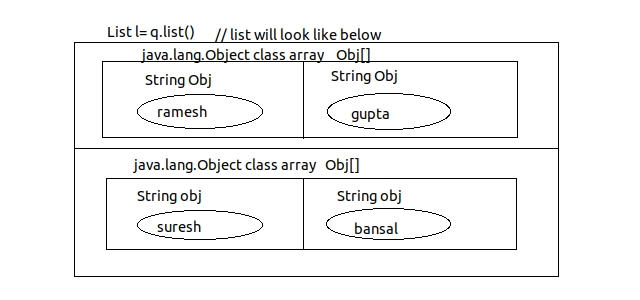
-if HQL Select query retrives single collumn values from db table , then generated list datastructure object contains wrapper class ojbect as element values representing the retrived collumn values.
Executing HQL Sub Query
getting records using count(*) aggregate function
Executing HQL with multiple aggregate functions.
Using Iterate() on Query Object to retrive values.
- it uses n+1 queries to select records. i.e. 1st query will select all identity values of records.- and other n no. of query will select the records with help of the identity value. retrived by above query.
- in case of q.list() , it will generate only 1 query to fetch records.
- q.iterate() method's behaviour is same as q.list() in case of retriving specific column values.i.e. it will retrive rows in form of Object[] arrays.
Q) what is difference between q.list() and q.iterate() method.
| q.list() | q.iterate() |
|---|---|
| retrives all records at a time by generating single sql select query | retrives 1 record at a time by generating n+1 select queries to retrive those multiple records. |
| HB POJO class object will be created and initialize eagerly.performs eager loading of record | performs lazy loading of record |
| creates HB Pojo class objects based on no. of records that are selected. | creates more HB POJO class objects compared to no. of records that are selected. |
| doesen't create proxy object | creates proxy object for each record. |
| returns List datastructure directly. | returns Iterator object pointing to List datastructure. |
HQL Non-Select Queries.
-> HQL insert query cannot insert record directly to database table . but it can be used to insert records into db table by retriving the records from another db table.-> insert into...values...(this query is not present in hql) but insert into...select from...(this query is available)
-> use ses.save(-) ,ses.persist(-) methods to insert the records directly.
deleting record with HQL
Pagination
--> we have setFirstResult(int) & setMaxResults(int); methods of Query interface to perform pagination.
Native SQL:-
- The orignal database software dependent sql queries.
- these queries will be written based on table-names and db column-names.
- these queries based persistence logic is db software dependent.
- supports both select and non select queries including single record insertion and DDL operations.
- SQLQuery(I) object represents each native sql query. SQLQuery(I)---->Query(I)
- it is mainly given to call PL/SQL procedures and functions of underlying db software.
- There are two types of NativeSQL queries
- Entity Select queries (selects all the column values of db table.)
- Scalar select queries (selects specific Column or values of db table.)
- Entity query results must be registered with HB-POJO class. by using addEntity(--) method to see results in form of HB-POJO class object
- mapping scalar query results with HB Datatype is optional using addScalar()
Limitations of Native sql
- Native SQL Queries based persistence logic is db software dependent
- We can't use iterate() to execute Native SQL Select queries i.e. lazy loading is not possible.
--> select FNAME,LNAME from Employee (Native SQL Scalar query)
--> select count(*) from Employee (Native SQL Scalar query)
Q) When to use HQL Queries & when to use Native SQL queries ?
--> prefer HQL Queries in most of the cases. but if we are not able to perform some operation with HQL then only we can go for Native SQL. like...
--> selecting records with multiple conditions.
--> to call database procedure and functions of db software.
--> to insert single record with HQL in such situations we
Executing Native sql select Entity query
--> if native SQL entity select query results are not mapped with HB POJO class, then generated List d.s. contains java.lang.Object class object array[] as row of elements. otherwise if results are mapped , then generated list d.s. contains HB POJO class objects as elements.--> to make above application giving list with Pojo class objects we can make following changes.
--> native sql query can have both named and positional parameters. but we can't place positoinal parameters after defining named parameters.
Executing Native SQL scalar query :-
-> this query will always give list d.s. having java.lang.Object clss Object[] as elements.Executing Non Select Native SQL Queries
Executing DDL query with Native sql
Q) What is difference between HQL and Native SQL query
| HQL | Native SQL |
|---|---|
| queries are DB s/w independent | queries are db s/w dependent |
| supports both lazy loading and eager loading (with l.iterate()) | supports only eager loading |
| queries will be written with HB-POJO class and it's properties | queries will be written by using db-table name and it's column names |
| can't be used to call PL/SQL procedures and functions | can be used to call PL/SQL procedures and functions |
| doesen't support direct record insertion and DDL Operations | supports direct record insertion and DDL Operations. |
---> native sql queries supports pagination by using same old q1.setFirstResult(-) & q1.setMaxResults(-) methods.
Calling Procedure and Functions from HB application.
--> to be added...Criteria API:-
- Allows to develop persistence logic through java statements without using any kind of queries.
- this persistence logic will be written by using DB POJO class and it's member variables so it is persistence logic is db s/w independent.
- hibernate internally uses reflection API to execute criteria API logic. this gives better performance compared to HQL
- creteria API is very suitable to retrive data from table with multiple conditions.
- allows all kinds of select operations but doesen't allow non select ddl operations.
- Criteria object represent Criteria persistence logic. & Criterion objects represents Conditions
- doesen't allow iterate() method based lazy loading.
- Criteria api logic is specific to one session object and can't be made as global object as visible to multiple session objects.
- criteria API suports pagination but doesen't allow to call PL/SQL procedures and functions.
Retriving all records of table using criteria API.
- we can add conditions to Criteris object as ct.add(Criterion_obj)
- the static methods of org.hibernate.criterion.Restrictions class give Criterion object representing conditions.
- multiple conditions can be added to criteria object. those will be executed by having 'and' clause in query.
Q) what is difference between Criteria object and Criterion object.
- Criteria object represents the whole criteria api persistence logic. in that Criterion object represents conditions.
- Criteria object is object of class that implements org.hibernate.Criteria (I) & Criterion object is object of class that implements org.hibernate.criterion.Criterion (I)
retriving records with ascending or decending order using criteria api
providing conditions as sql statement to criteria API logics
Using Projections. (performing scalar select operation retriving speific column values in criteria API environment.)
- We can take support of org.hibernate.criterion.Projection(I) for this operation.
- Create multiple Projection object for multiple properties or field names.
- add projection objects to ProjectionList object.
- finally set ProjectionList object to Criteria object.
Using Projections to retrive aggregation results.
Using CriteriaAPI logic by applying both "or" & "and" clauses.
Mappings in Hibernate
- How we will represent data tables if some classes are inheritance hirarchy ?
- How we will store data in database table if we have collection variable as data member ?
- How we will represent OneToOne or OneToMany or ManyToMany relationships in database ?
- the answer is using mappings. hibernate provides mapping techniques to deal with such problems.
-
- Collection Mappings
- Inheritance Mappings
- Association Mappings
Collection Mapping
Below are few steps we can follow- @ElementCollection to be putted below annotation on Collection Attribute like Set,List or Collection in your pojo class..
- @JoinTable(name="tableName", joinColumns=@JoinColumn(name="collmn_name_tobe_given_for_primary_key") )
this annotation is not mandatory.
if not used then hibernate will use attribute 'ClassName_attributeName' as a name of table classname_primary_key as foreign key for reference table. - @Embedable(class level annotation) annotation is required when your collection element is of UserDefined Type. like 'Answer' class..
- @Column(name="name_of_db_column") on all attributes if required.
- in below example i have just used String as a List's type. we can add Userdefined Type as well with help of @Embedable annotation
Questions.java
Example using UserDefined collection.
Answer.java (UserDefined datatype.)
Question.java
Note:- this stores map values correctly . but need to check for changing answer's column_name for key.
Example for Predefined Set would be simmiler to ArrayList.
Inheritance Mappings
We have following inheritance mappings.- Table Per Hirarchy
- Table Per Class
- Table Per Subclass
e.g. <mapping class="package.name.ClassName"/>
TablePerHirarchy inheritance mapping
- In this Type only one table will be generated for all hirarchy of classes.
- this uses discriminator collumn to identify record is of which type.
- we are defining default values for discriminator collumn to be inserted at time of record insertion.
BaseClass Annotations.
Class level annotations.DerivedClass Annotations
class level annotations.Note:-> no primary key annotation as it will use base calss primary key.
annotations on other attributes.
TablePerClass inheritance mapping.
- In this type table will be generated for each class. i.e. for base class there will be a table. and derived classes will also have tables.
- This avoids nullable values as like in TablePerHirarchy inheritance mapping.
- problem with this strategy is , we are making completly new collumn's for parent class attributes. i.e. same collumn's for parent attributes will be available in all the tables.
BaseClass annotations.
Class level annotations.Derived Classes annotations. (apply below annotations to all derived classes.)
Classl level Annotations.Table Per Subclass inheritance mapping.
- in this strategy tables will be created for each classes.
- records will be joined using primary-key and foreign key relationship.
- this avoids duplicate collumn's as like in TablePerClass inheritance mapping.
BaseClass annotations.
Class level annotations.Derived Classes annotations. (apply below annotations to all derived classes.)
Class level annotations.Association Mappings
following are types of Association Mappings.- One To One Association Mapping
- One To Many Association Mapping
- Many To Many Association Mapping
One To One Association Mapping
reference link :- dzone.com- In this mapping records will be idnetified by hibernate with help of foreign-key column.
- foreign key column will be added in Student table.
- if name not supplied with @JoinColumn then hibernate will take property name as FIRST_CLASS_SECOND-CLASS.
- Also , we can specify property names above getters, that would be preffered.
- E.X.: Association statement :- One Student Has only One Address. (Has a relationship between classes.) so Student class will have Address class object as a data member.
One To Many Association Mapping
Association statement :-One Student can Have multiple phone numbers.
Solution 1:- Using Foreign Key. [it will make 2 tables only.]
reference link :- javatpoint.comSolution 2:- Using Reference Table. [it will make 3 tables]
reference link :-dzone.com- in this type of mapping , two tables will be created for two Entity classes.
- there will not be any foreign key.
- another table will be created i.e. 3rd table will be created with first-table-name_second-table-name.
and primary keys of these two tables will be stored in two collumns. - @OneToMany annotation on the property of HAS-A relationship class will be enough.to perform this mapping.
if we not use @JoinTable annotation then it will create 3rd table with default names.
i.e. table name, primary_key column of table 1 & primary_key_of second column will be according to
datamember/variable names. - @JoinTable annotation will be required to customize the default names that will be given to the 3rd table.
HibernateUtil.java
Many To Many Association mapping.
Association statement :- One Student can have many Courses & One Course can have many Students.
reference link :- dzone.comStudent.java
App.java.
Hibernate Cache
- Cache or Buffer is a temporary memorey that holds data for temporary period.
- in client-server communication, the cache at client side preserves server application supplied data and used it across the multiple same request and reduces network round trips between client application and server application.
- the content of cache must be emptyed at regular intervals to gather uptodate results from server application.
- Hibernate supports two levels of caching as client side caching to reduce network round trips between application and db software.
-
- First Level/L1 cache :-
- it is Session object level cache.
- it is built-in cache.
- Every Session object of Hibernate application contains one L1 Cache.
- Second Level / L2 cache / Global Cache:-
- it is SessionFactory level cache
- it is configurable cache.
- Every SessionFactory object of Hibernate application contains one L2 cache.
- First Level/L1 cache :-
- Both L1 & L2 cache maintains results / records in the form of Hibernate POJO clas object.
- When HB application generates requests through session Object first the results will be verified in L1 cache of that session object.
- if result/ record is not available in Session object or L1 cache then it will be looked up for L2 cache of SessionFactory object.
- if result/ record not available in L2 cache as well then it will interact with DB software and retrive record.
- once records are retrived then it will register in L2 cache and then it will be registered in L1 cache before giving to client application.
- these registered results of cache will be used across the multiple same requests.
First Level Cache / L1 cache
- every session object contains on L1 cache.
- this cache remembers multiple modifications done to object duting a transaction and generates single update query at the end of transaction refleting all the modifications.
- if application wants to display same record multiple times, it will select record from db table only 1 time and keep in L1 cache as HB POJO class object. and uses it multiple times.
- sample code
to control L1 cache
- ses.clear() :- cleans L1 cache
- ses.evict(eb) :- removes "eb" object from L1 cache.
- sesclose():- closes the session object and it's L1 cache.
- ses.disconnect():- disconnects session object from DB s/w and closes it's L1 cache.
Second Level Cache / L2 cache
- it is SessionFactory object level cache (Global Cache)
- it is not build in cache that means this cache must be configured explicitly.
- there are multiple 3rd party vendors supplying second level cache some examples are
- EHCache
- SwaramCache
- JBossTreeCache ...etc
steps to add L2 Caching Using EHCache in our application.
- add maven dependency in your pom.xml or add required jar to classpath in case if not using maven.
<!-- https://mvnrepository.com/artifact/org.ehcache/ehcache --> <dependency> <groupId>org.ehcache</groupId> <artifactId>ehcache</artifactId> <version>3.6.2</version> </dependency>
- register cache provier's class in hibernate.cfg.xml and enable second level cache
<property name="cache.region.factory_class"> org.hibernate.cache.EHCacheRegionFactory </property> <property name="cache.use_second_level_cache"> true</property>
- specify caching strategy in hibernat mapping file or in Hibernate POJO class. .... need to be added.
- sample application to verify above changes..
//get record from db and store in L2 & L1 cache. Employee eb=(Employee)ses.load(Employee.class,101); System.out.println(eb.toString()); //again write same code and test L1 cache first.. //observe that query will not be generated this time. Employee eb=(Employee)ses.load(Employee.class,101); System.out.println(eb.toString()); //now clear the L1 cache.. ses.clear(); //again get record .. this time it will be retrived from L2 cache. Employee eb=(Employee)ses.load(Employee.class,101); System.out.println(eb.toString()); //as we are setting timeout for L2 Cache it will be cleared after timeout. //now again clean L1 cache. Thread.sleep(..timeout+few seconds..); ses.clear(); //get record from db and store in L2 & L1 cache. Employee eb=(Employee)ses.load(Employee.class,101); System.out.println(eb.toString()); ses.close(); factory.close();
Query Cache
- it is subchache of Second level cache. and preserves HQL,NativeSQL query results in their orignal format and not in the form of HB Pojo lass object.
- if Query region name is not specified using Query.setCacheRegion(-) then HQL,NativeSQL query results will be saved in default QueryCache region
- to enable QueryCache 1st we need to enable L2 cache and we should also add following property in hibernate.cfg.xml
<property name="cache.use_query_cache">true<property>
- to control L2 cache and Query cache we an call following methods.
- factory.close() :- destroyes HB sessionfactory object and releases L2 cache and JDBC pool
- factory.evict():- removes all bean class objects form L2 cache.
- Cache ch=factory.getCache()
ch.evictEntityRegion(POJO.class); alternative to factory.evict() method - Cache ch=factory.getCache()
ch.evictQueryRegions() removes entities from default regions - factory.evictQueries("region_name"):- removes query results form specified region.
- Cache ch=factory.getCache()
ch.evictQueryRegions("region_name") alternative to factory.evictQueries("region_name")
Versioning in hibernate
Hibernate's one of the feature is versioning. it means if you want to track how many times a record is modified then hibernate needs a property
<version name="version" type="long"> in hbm.xml file or it needs a @Version on a property's getter in case of annotation
but remember it is not managed by hibernate if a record gets updated externally in the database.
Identity Generation Algorithms
- JVM identifies every object through hashcode. simmilerly Hibernate identifies POJO class object through it's identity value.
- Hibernate uses this identity value as the criteria value to perform synchronization between objects and db-table rows.
- we can use Hibernate provided algorithms or we can create our own algorithm to generate identity value by implementing
org.hibernate.IdentifierGenerator(I) interface.
below are few ID generation algorithms.
- Assigned (org.hibernate.id.Assigned):- this algorithm let's user assign the value to the identity field before calling session.save(-). i.e. whatever you want to assign as identity value. this is default algorithm.
- Identity Algorithm:- this algorithm works with db softwares which support auto increment collumn.
to use this algorithm .
<id name="no" column="eid"> <generator class="identity"> <id> or with annotation @Id @GeneratedValue(strategy=GenerationType.IDENTITY) public int getId() { return id; } -
Increment Algorithm:- this will use max val +1 formula to generate id.
it will not consider deleted collumns while generating value.
<id name="no" column="eid"> <generator class="increment"> <id> -
Sequence Algorithm:- it can be used with database softwares that support Sequences.
<id name="no" column="eid"> <generator class="sequence"/> <param name="sequence"> sequence_name</param> <generator> <id> or @Id @GeneratedValue(strategy = GenerationType.SEQUENCE, generator = "book_generator") @SequenceGenerator(name="book_generator", sequenceName = "book_seq", allocationSize=50) -
Hi/Lo:- generates identity value of type long,short,int.
this algorithm uses helper table collumn value as the source of high value &
max low value as source of low value while generating identity values.
in hibernate mapping file
<generator class="hilo"> <param name="table">mytab</param> <param name="column">mycol</param> <param name="max-10">5</param> </generator> - Native:-
this algorithm picksup identity , sequence,hilo algorithm depending upon the capability of underlying db software.
if underlying db s/w supports sequences like oracle then it will use sequence algorithm internally.
& if db s/w supports both sequence & identity collumns then it internally uses hilo algorithm.
<id name="no" column="eid> <generator class="native"> <generator class="native> <param name="sequence">myseq</param> </generator> </id> -
UUID:- uses a 128 bit UUID algo to generate identifiers of type string by using IP address of network.
this UIID identity value comes as string of hexadecimal digits of length 32.
<id name="no" column="eid> <generator class="uuid"/> </id> - Own Implementation:- if you don't like above all algorithms. then go for our own implementation.
Hibernate POJO class Life-Cycle.
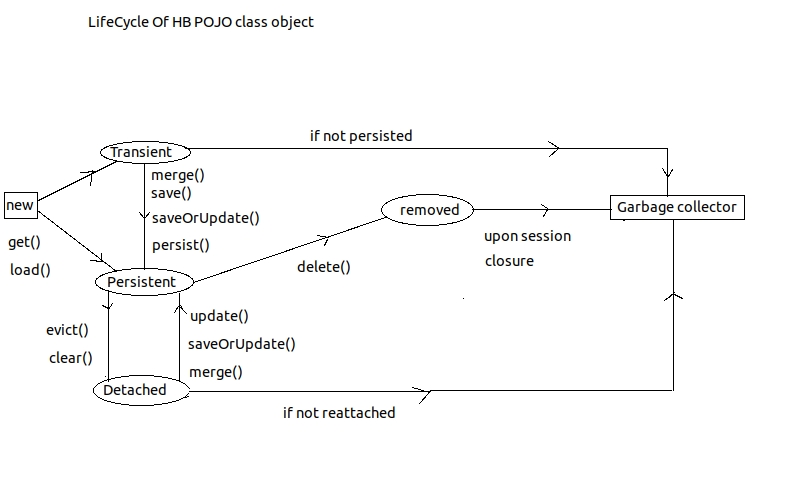
We can create HB Pojo clas object residing in one of the following 3 states.
- Transient State:-
-not associated with session. i.e. just created Pojo Bean object.
-no identity value
- Persistent State:-
- Associated with session i.e. called save() or saveOrUpdate() or merge() or persist() method
- Contains Identity value.
- Maintains Synchronization with db table record.
- Detached State:-
- not associated with session currently i.e. after calling evict(), or clear() method.
- contains identity value but doesen't maintain Synchronization with db able record.
Hibernate Schema tools
Hibernate gives 3 tools as command line tools to create or alter db tables according to the configurations done in Hibernate mapping files. these tools are useful when you want to migrate to a new database for your application.
- SchemaExport:-
- always creates new db table based on hibernate mapping file configurations. drops tables if necessary.
- we can control new db table setting by providing attributes in mapping files.
- e.g. cmd> java org.hibernate.tool.hbm2ddl.SchemaExport --config=hibernate.cfg.xml
-
SchemaUpdate:-
- this tool creates table if it is not already available.
- uses existing db table if it is already available and modification are not required in db table.
- alters tables if required.
- e.g. cmd> java org.hibernate.tool.hbm2ddl.SchemaUpdate --config=hibernate.cfg.xml
-
SchemaValidator:-
- this tool will not create new db tables. it will just validate if db tables are according to provided mapping files.
- e.g. cmd>java org.hibernate.tool.hbm2ddl.SchemaValidator --config=hibernate.cfg.xml
Hibernate Connection Pooling
- Dont use HB built-in Connection pool in any real time project. we have alternative for third party connection pools.- and if application is to be deployed in web/application server then we can go for server managed JDBC Connection pool.
- based on the property value that we configure in hibernate.cfg.xml, hibernate will choose the connection pool Hibernate.connection.provider_class
- e.g. configure connection provider class in configuration file.
<property name="hibernate.connection.provider-class"> org.hibernateconnection.c3p0ConnectionProvider </property>
- to use build-in JDBC connection pool (default)
org.hibernate.connection.DriverManagerConnectionProvider
- to use c3p0 JDBC connection pool (dependent jar required.)
org.hibernate.connection.c3p0ConnectionProvider
- apart form this we would need few properties in hibernate.cfg.xml as follows.
<property name="hibernate.c3p0.max_size">10<property> <property name="hibernate.c3p0.min_size">1<property> <property name="hibernate.c3p0.timeout">5000<property> <property name="hibernate.c3p0.acquire_increment">1<property>
- to use proxool JDBC connection pool (dependent jar required.)
org.hibernate.connection.ProxoolConnectionProvider
- this requires seperate xml connection pool configuration file and additional properties in hibernate.cfg.xml as below.
<property name="proxool.xml">xmlfilename.xml<property> <property name="proxool.pool_alias">alias_name_configured_in_xmlfilename.xml<property>
- to use server managed JDBC connection pool
org.hibernate.connection.DatasourceConnectionProvider